OpenClaw has become a bit of a bonding experience for me and my new brother-in-law.
We both bought Mac minis. We both started trying to automate more of our lives. And we both kept quietly competing over who had gone further.
He was recently promoted to VP of his sports club and was overwhelmed by the operations he now had to manage. At Sunday dinner, I joked that we should get his OpenClaw to start taking care of it.
So a handshake deal was struck: every Sunday, I would help build out an AI assistant for his club, and he would BBQ some Costco steaks for me.
We plugged in the Mac mini, hatched a new agent called Ace, and connected it to his team’s Slack.
…and it was chaos.
This image is only illustrative, but it certainly captures the vibe.
We unplugged it, took a breath, and had some more steak.
Then we tried again, slower.
One month later, Ace was actually useful. It could help with marketing work, learn from its misses, and give us a path to expand into other parts of the club.
This is what we learned.
Start Slow
An agent can be right often enough to be exciting, but wrong often enough to create cleanup work. If you give it the whole business too early, you just create more chaos.
It works better when you start with one skill. Watch where it gets stuck. Fix that. Then give it the next thing.
Deploying OpenClaw is a lot like hiring a person. You do not throw someone into the deep end on day one and expect them to run the company. You onboard them. You teach them. You help them learn.
Let Agents Work Like Agents
The second lesson was that agents should not always copy human workflows.
You have to adapt the workflows to the agent. For example, we kept asking Ace to make social posts with Canva, and we couldn’t get a nice-looking result. We began to realize that it is much harder for an agent to use an MCP tool than it is to just code up a design in raw code (HTML) and export that as an image.
The goal is not to make Ace act like a human. The goal is to build workflows where Ace has a clean path to do the work.
Sometimes that means using a connector. Sometimes it means writing code. Sometimes it means building a CLI tool so Ace can make a court reservation directly instead of navigating a website like a person.
The workflow should fit the agent.
Close the Loop
Lastly, much of our improvement came from letting another agent like Codex run loops to understand how OpenClaw is performing and improve its performance.
A second agent watching the first.
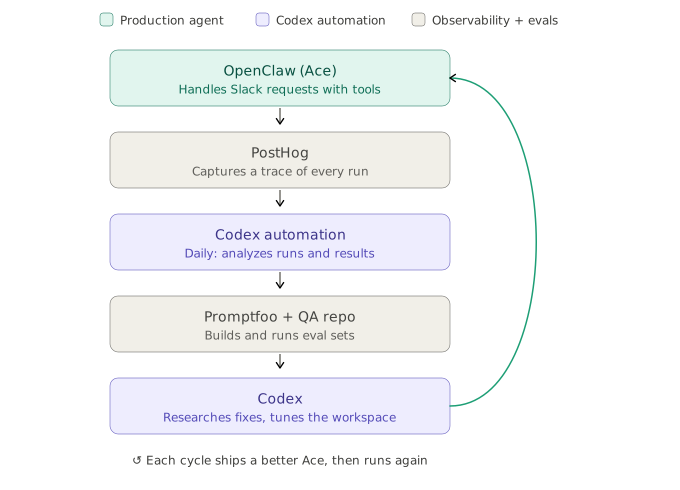
OpenClaw does the work; PostHog captures the traces; Promptfoo and a QA repo turn them into evals; and a daily Codex automation closes the loop.
Let’s run through an example.
A marketer asks Ace for a social post advertising Friday’s BBQ. Ace opens its Canva MCP, makes something mediocre, and sends it back.
Overnight, Codex’s automation pulls the traces from PostHog, bundles this request together with every other marketing ask into an eval set, and runs it. It fails. Codex digs into why: Ace has no brand guidelines, and the Canva MCP barely gives it any control. Then it lines up the alternatives: Canva, a raw HTML file, or GPT ImageGen. I write up brand guidelines, Codex runs an eval for all three, and HTML wins clean. We push an updated skill to Ace.
After the update, the same request comes back looking sharp. Better still, Codex notices that Ace could have anticipated the whole thing by reading the month’s Asana tasks and suggests adding that to its heartbeat.
OpenClaw has been a fun experiment because there is nothing else out there with this much capability out of the box that continues to scale.
OpenClaw feels different because it is built to grow. The magic is that users ask Ace to do something, Ace figures out the best way to do it, and then the system can improve from what happened.
That is the part I keep coming back to.
You are not just making smaller workflow-built agents. You are growing an agent.
Ace is getting better every week.
And the Sunday steaks have been excellent.